 PDF Agile
 How to Convert PDF to Word, Excel, and PPT Offline with Formatting Preserved
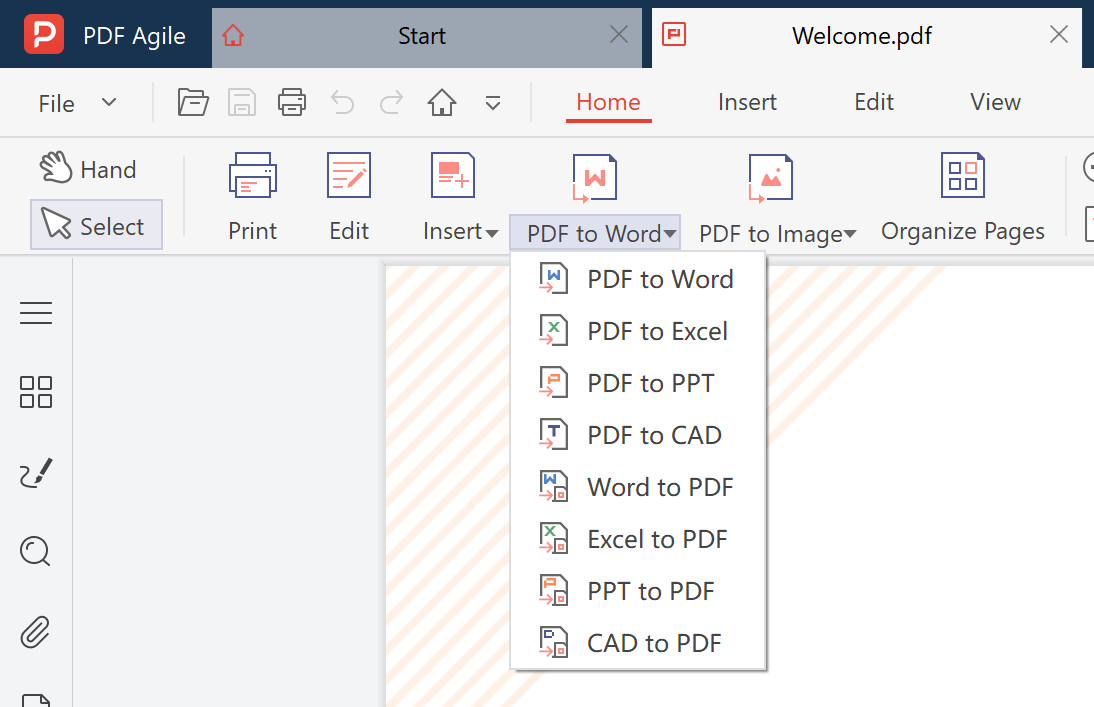
Need to edit a PDF in Word, extract data into Excel, or reuse slides in PowerPoint? Online converters upload your files to unknown servers and often scramble your formatting. Here's how to convert PDF to Word, Excel, and PPT offline — keeping every font, table, and layout intact.
1. Convert PDF to Word (.docx) Offline
PDF Agile converts PDF to Word with full formatting preserved — fonts, paragraphs, tables, and images all stay exactly where they should. Everything runs locally on your computer, so sensitive documents never leave your device. One-time payment, no subscription.
2. Convert PDF to Excel (.xlsx) for Data Extraction
When your data is trapped in a PDF table, retyping it into Excel is painful and error-prone. PDF Agile extracts tables directly into .xlsx files, preserving cell structure, numbers, and formulas — no manual entry needed.
3. Convert PDF to PowerPoint (.pptx) for Reusable Slides
Turn PDF presentations back into editable PowerPoint files. Each page becomes a slide with text, images, and layout preserved. Perfect for updating old decks without rebuilding them from scratch.
4. Batch Convert 100+ Files in One Click
Don't waste time converting files one by one. PDF Agile's batch mode lets you select dozens or hundreds of PDFs and convert them all to Word, Excel, or PPT simultaneously — offline, on your own machine.
5. Why Offline Conversion Beats Online Tools
Online PDF converters require you to upload files to remote servers — a privacy risk for contracts, financials, and personal documents. They also impose file-size limits, queue delays, and watermarks on free output. Offline conversion with PDF Agile means zero uploads, zero limits, and zero watermarks.
Convert PDF to Word, Excel, and PPT offline — formatting preserved, privacy guaranteed.
Download PDF Agile Free TrialKey Takeaways
- PDF to Word conversion preserves fonts, tables, and layout when done offline with PDF Agile.
- PDF to Excel extraction keeps cell structure intact — no manual retyping required.
- PDF to PowerPoint conversion turns each page into an editable slide.
- Batch processing converts 100+ files at once, all running locally on your machine.
- Offline conversion means no file uploads, no size limits, and no watermarks.